The Autotask PSA integration imports companies, active service contracts and billable time entries from Autotask into PracBill customers, services and line items, daily at 2 AM or on demand. Set it up once per department in Department Settings, then monitor it under Admin, Autotask Sync.
¶ What gets synced
| Autotask | PracBill | Rule |
|---|---|---|
| Companies | Customers | Created on demand when one of their contracts syncs. Never bulk imported. |
| Contracts | Engineering services | Active contracts whose SKU matches your prefix (e.g. PRACBILL). Updated on every sync. |
| Time entries | Service line items | Billable and approved entries only, from the last 90 days (or your sync window), priced at your fixed hourly rate. |
Not synced: internal Autotask notes and private fields (except Internal Description), Autotask user credentials, and contracts that do not match the SKU prefix.
¶ Before you start
| Item | Why |
|---|---|
| Autotask administrator access | To create the API user and credentials. |
| PracBill admin access to the department | To edit Department Settings. |
| Your hourly rate for time entries | Entered as the fixed hourly rate, e.g. 150.00. |
¶ Create API credentials in Autotask
- Log in to Autotask as an administrator.
- Go to Admin, Resources (Users), New.
- Create a user: Username
pracbill-api(or similar), Security Level API User (System), License Type API User. - Save the user.
- Open the Credentials tab and click New Credentials.
- Select API Key as the type.
- Copy the Username and the Secret. The secret is shown once.
Use a dedicated API user, not a personal account. The user needs read access to Companies, Contracts and Time Entries.
¶ Configure PracBill
- Open Admin, Department Settings, click Edit and scroll to the Autotask card (see Set up your department for the Edit screen).
- Enter the API Username (usually an email address).
- Enter the API Secret. It is case-sensitive.
- Enter the Hourly Rate (Time Based Charges) applied to every imported time entry.
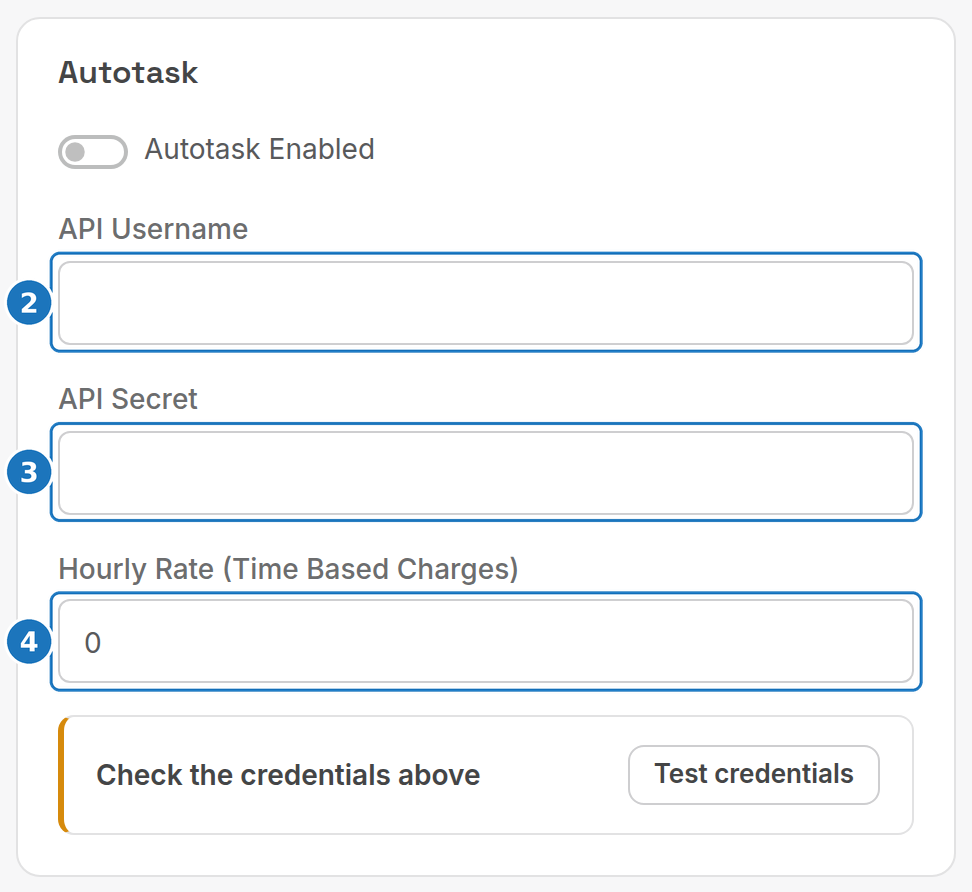
- Click Test credentials and wait for the success message.
- Turn on Autotask Enabled.
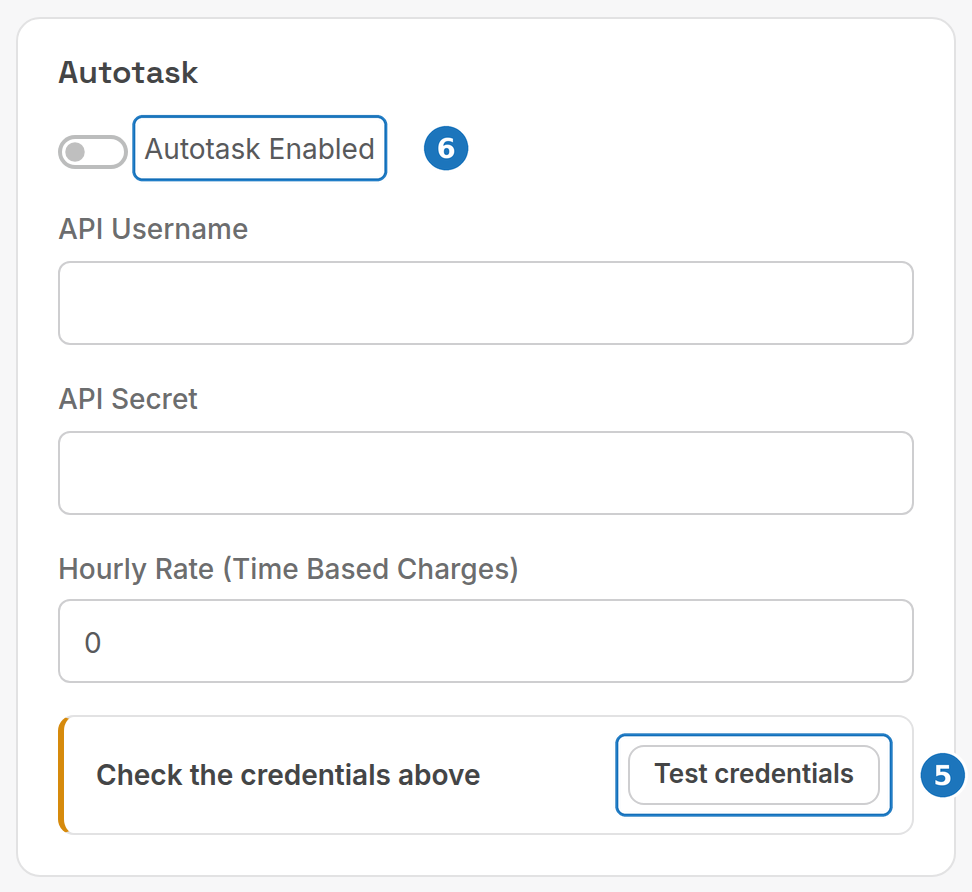
- Click Save at the bottom of the page.
| Setting | What it does |
|---|---|
| Autotask Enabled | Turns the daily sync and manual syncs on. Turn it off to stop syncing; existing data stays in PracBill. |
| API Username / API Secret | The Autotask API user credentials. The secret is stored encrypted and never shown in full. |
| Hourly Rate (Time Based Charges) | Fixed rate multiplied by hours on each time entry. |
| Contract SKU prefix | Only contracts whose SKU starts with this prefix sync. Default PRACBILL. |
| Sync window (days) | How far back time entries are fetched. Default 90. Reduce to 30 if syncs are slow; increase temporarily to backfill. |
If the SKU prefix or sync window fields are not on your Autotask card, ask PracBill support to change them for your department.
Each department has its own Autotask configuration, dashboard and logs, so several departments can use one or several Autotask accounts with different prefixes and hourly rates. Test the credentials again after any credential change, and after PracBill releases an integration update.
¶ Sync dashboard
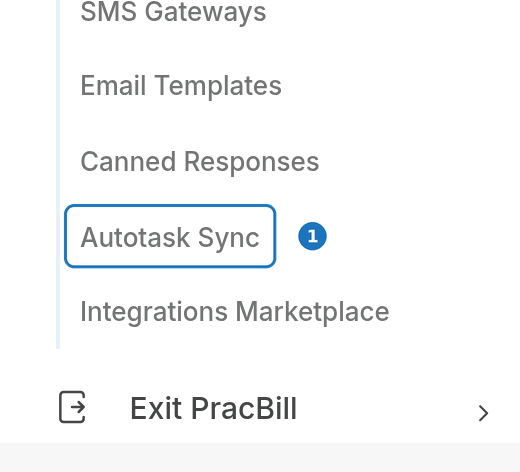
- Open Admin, then Autotask Sync.
The Configuration Status card tells you if credentials are missing. The Sync Dashboard card shows counts for Companies Synced, Contracts Synced, Time Entries and Errors (24h), plus the Last Contract Sync time.
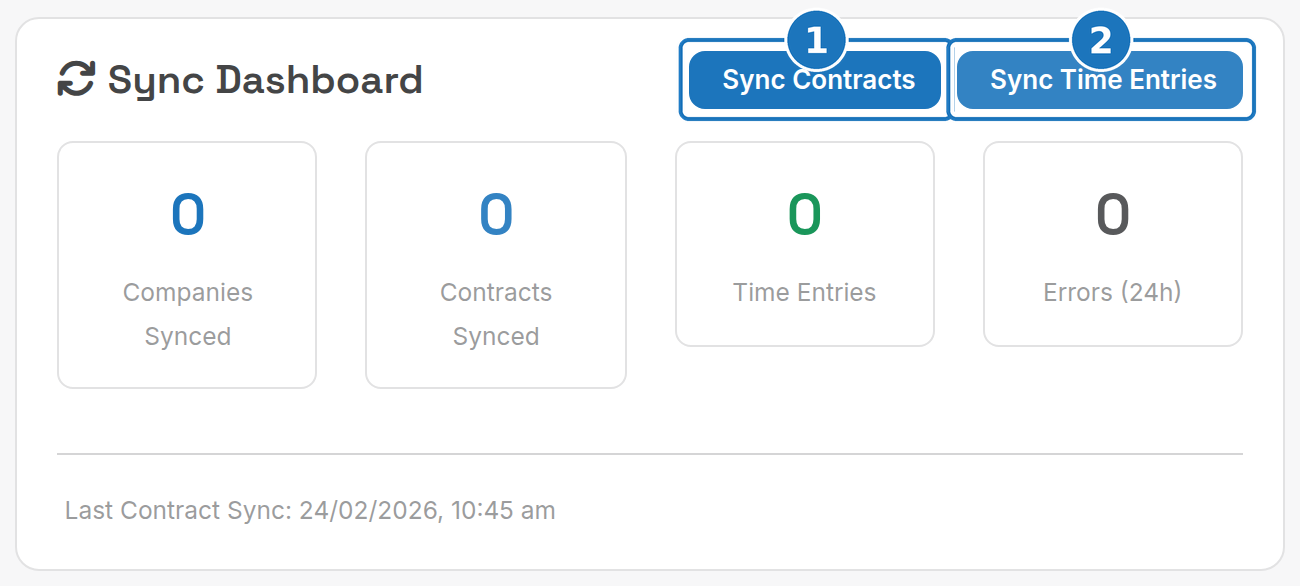
Check the dashboard weekly: a rising error count means something needs attention in the logs.
¶ Sync contracts manually
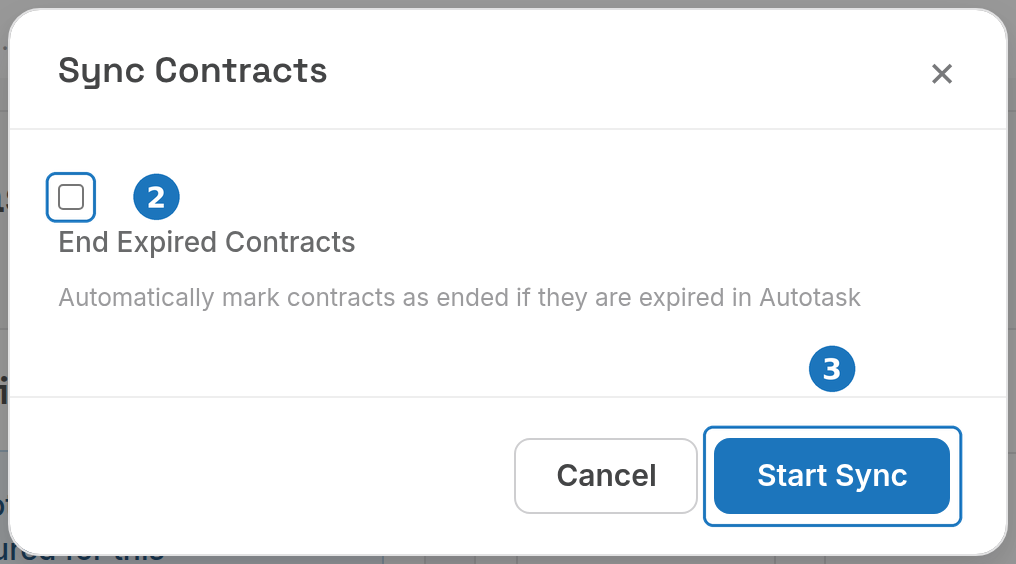
- Click Sync Contracts.
- Tick End Expired Contracts to mark services as ended when their contract has expired in Autotask.
- Click Start Sync.
¶ Sync time entries manually
- Click Sync Time Entries.
- Set a Start Date and End Date. Leave them empty for the default window (90 days) ending today. Use an earlier start date to import historical entries.
- Click Start Sync.
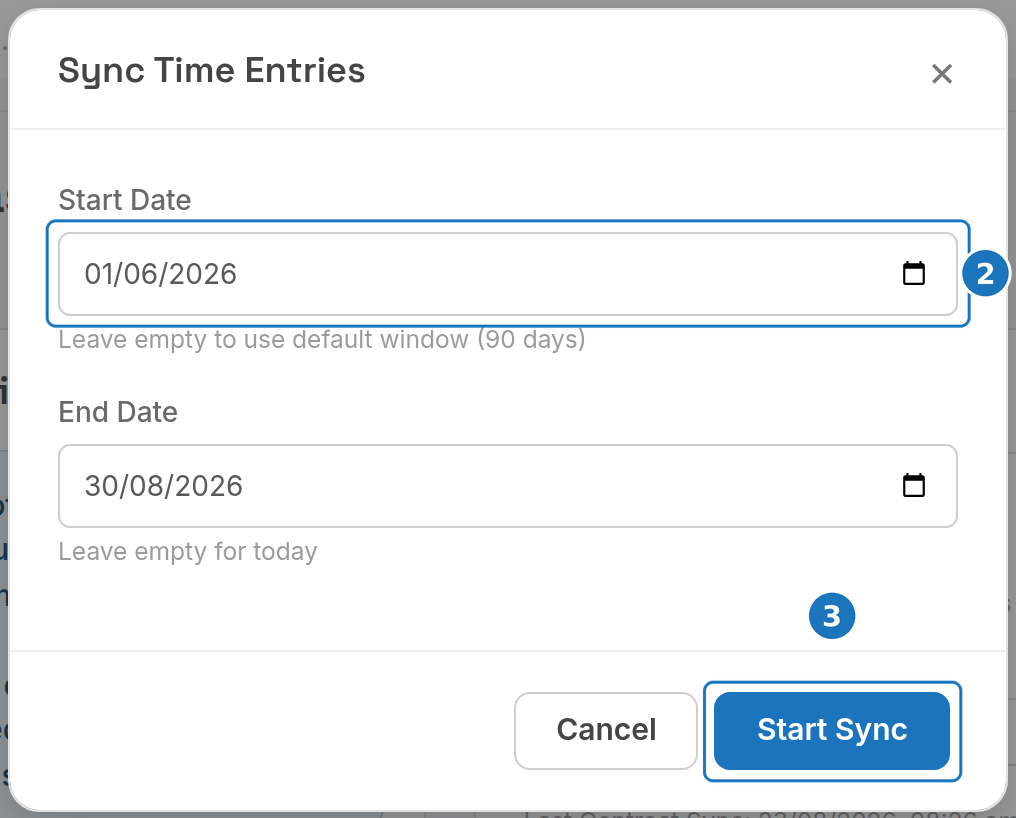
Manual syncs are queued and run by background workers, usually within seconds. You see "sync has been queued. Check the logs for progress." and the page refreshes after 2 seconds. Large historical imports take longer because of Autotask's API rate limit.
Always run Sync Contracts before Sync Time Entries. A time entry whose contract has not been synced fails with "No matching service found for time entry".
¶ Sync logs
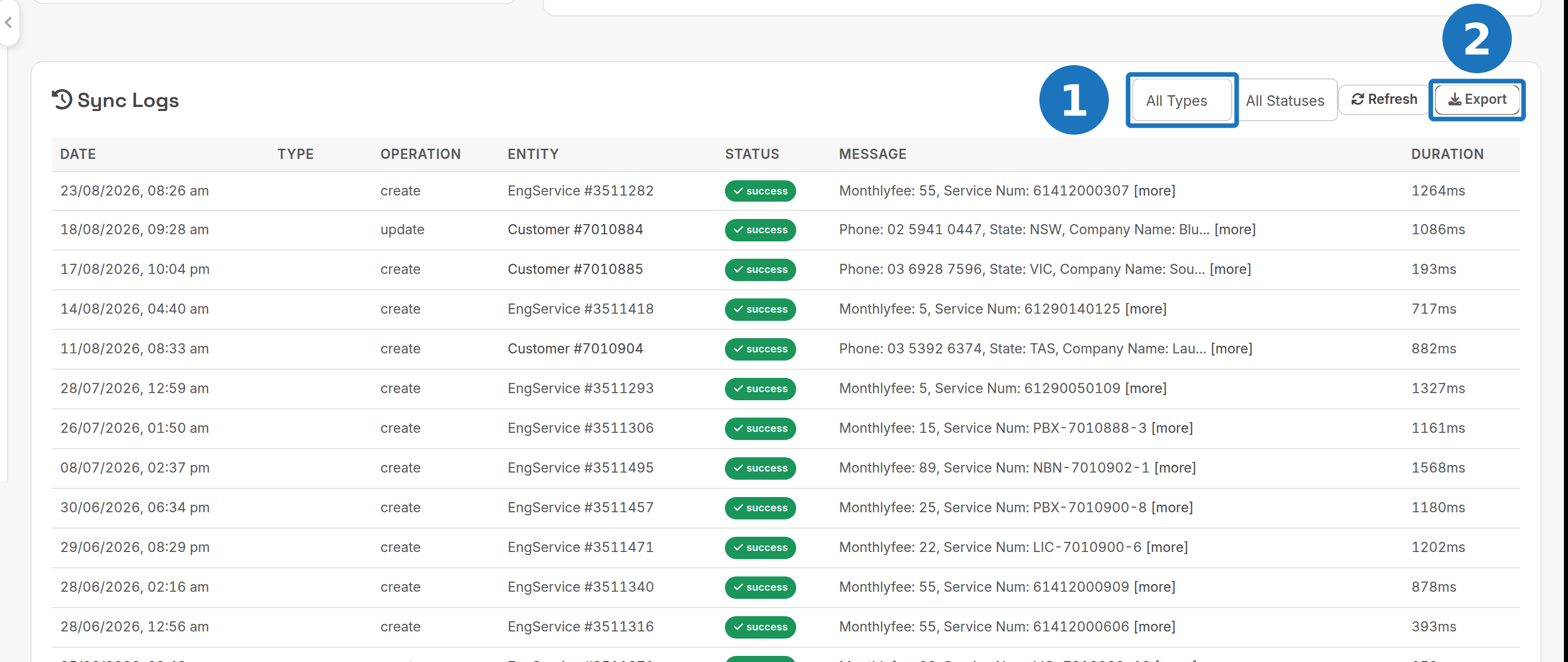
The Sync Logs card on the same page lists every operation.
- Filter by type (Company, Contract, Time Entry) and status (Success, Warning, Error), and by Start Date and End Date.
- Click Export to download the filtered logs as CSV (
autotask_logs_{department_id}_{timestamp}.csv, columns ID, Sync Type, Operation, Status, Message, Duration (ms), Created At). Attach it to support tickets.
| Column | Meaning |
|---|---|
| Date | When the operation ran. |
| Type | company, contract or time_entry. |
| Operation | create, update, skip or error. |
| Entity | The PracBill record touched (Customer #, Engineering #). |
| Status | Success (green), Warning (yellow), Error (red). |
| Message | What happened. Click [more] to open the full JSON details: synced field values, API responses, validation errors, stack traces. |
| Duration | Milliseconds. Most operations finish under 500 ms; over 2000 ms is slow. |
| Status | Meaning | Action |
|---|---|---|
| Success | Completed | None |
| Warning | Completed with minor issues | Read the message; often informational |
| Error | Failed | Investigate and fix |
| Skip | Intentionally skipped, e.g. wrong SKU or inactive contract | None, expected |
Review the logs monthly: filter Status = Error from a month ago, export the CSV for your records and fix recurring errors. Periodically compare contract and time entry totals between Autotask and PracBill and report discrepancies to support.
¶ How the sync works
¶ Daily at 2 AM
- Contract sync fetches active contracts. Only contracts matching the SKU prefix are imported, customers are created if missing, and existing services are updated with the latest contract details.
- Time entry sync fetches billable, approved entries from the sync window, links each to its service and applies the fixed hourly rate.
A failed operation is retried up to 3 times with exponential backoff, logged, and does not stop the rest of the sync. Brief Autotask outages (logged as "Connection timeout" or "Service unavailable") recover on the next retry.
¶ Contract field mapping
| Autotask field | PracBill field | Notes |
|---|---|---|
| Contract Name | autotask_contract_name |
|
| Service Name | billing_name |
Billing description |
| Unit Price | monthlyfee |
Monthly fee |
| Invoice Description | notes |
Customer-facing invoice text |
| Internal Description | service_num |
Service identifier: phone number, username, serial, account ID (max 100 characters). Not shown on invoices. |
| Start Date | port_dateacc |
|
| End Date | date_ended |
To give a synced service an identifier (e.g. the phone number of a VoIP contract, used for searching, reporting and CDR matching):
- Open the contract in Autotask and go to the Services tab.
- Edit the service line item.
- Enter the identifier in Internal Description (e.g.
0412345678) and save. - Run Sync Contracts in PracBill. The value appears in the service's Service Number field.
¶ Customers
Customers are created on demand: when a contract like "PRACBILL-Managed-Services" for "Acme Corporation" syncs and no such customer exists, PracBill fetches the company from Autotask, creates the customer and links the contract. A customer imported this way has an Autotask Company ID on its record; the logs show it as Sync Type = Company, Operation = create.
¶ Editing synced data
Make changes in Autotask. Customer details edited in PracBill are not overwritten, service contract details may be overwritten on the next sync, and imported time entries are never modified by later syncs. Each Autotask item is tracked by its ID (time entries via autotask_time_entry_id), so re-running a sync updates rather than duplicates.
¶ Worked examples
| In Autotask | After the next sync |
|---|---|
| New contract "PRACBILL-Website-Hosting" for "New Company Inc" | Customer "New Company Inc" created, service "PRACBILL-Website-Hosting" created and linked. Log: contract, create, success. Check Customers and Services. |
| 5 hours logged, billable and approved, on a synced contract | Line item imported at 5 x $150 = $750, ready for the next invoice. Log: time_entry, create, success. |
| End date set on a contract | Service marked ended, no further time entries sync for it, history kept. Log: update, "contract ended". |
| Phone number entered in a service's Internal Description | Number appears in the service's Service Number field. |
¶ Troubleshooting
| Problem | Cause | Fix |
|---|---|---|
| No contracts syncing | SKU does not match the prefix (log: "Contract SKU does not match prefix", operation skip) | Rename the contract SKUs in Autotask or change the prefix. |
| No contracts syncing | Contract not Active (log: skip) | Check the contract status in Autotask. |
| No contracts syncing | Authentication | Test credentials on the Autotask card; re-enter if it fails. |
| No contracts syncing | Sync never ran (Last Contract Sync blank or old) | Run a manual sync; if it still does not run, contact support (background workers may be down). |
| Time entries not importing | Not billable (log: skip, "not billable") | Mark entries billable in Autotask. |
| Time entries not importing | Not approved | Approve them in Autotask. |
| Time entries not importing | "No matching service found for time entry" | Run Sync Contracts first, then Sync Time Entries. |
| Time entries not importing | Older than the sync window (default 90 days) | Increase the window temporarily, or run a manual sync with an earlier start date. |
| "Authentication failed" / "Invalid credentials" | Wrong username, secret or integration code | Check the username (usually an email), re-copy the secret (case-sensitive), regenerate in Autotask if needed. |
| "Connection timeout" / "Network error" | API URL, firewall, or Autotask temporarily down | Check the network and retry in a few minutes. |
| "Permission denied" / "Access forbidden" | API user lacks permissions | Ask your Autotask administrator for read access to Companies, Contracts and Time Entries. |
| "Rate limit exceeded" on Test credentials | More than 5 tests in 1 minute | Wait 1 minute. |
| "Rate limit exceeded" during sync | Autotask limit of 1000 requests/hour | The sync retries with delays and resumes within the hour. Ask Autotask for a higher limit if it recurs. |
| Slow syncs (over 2000 ms per operation) | Large dataset | Syncs run in batches. Reduce the sync window from 90 to 30 days. |
| Duplicate entries | Should not happen | Filter the logs by type, look for multiple create operations for one Autotask ID and database constraint errors, then send support the log screenshots and CSV. |
| Sync buttons do nothing | Integration disabled, or credentials missing ("Autotask API credentials are not configured") | Turn on Autotask Enabled and enter credentials in Department Settings. Check the browser console (F12) for AJAX or CSRF errors. |
| "Autotask integration is not enabled" | Toggle off | Turn on Autotask Enabled. |
When contacting PracBill support include: department name and ID, Sync Logs screenshots with the filters showing the issue, the exported CSV, a description with steps to reproduce, and what you have tried. Contact Autotask for API credential and integration code issues, and your Autotask administrator for permissions.
¶ Good practice
| Area | Recommendation |
|---|---|
| SKU prefixes | Start every PracBill contract with your prefix. Sub-prefixes like PRACBILL-MANAGED, PRACBILL-PROJECT, PRACBILL-SUPPORT keep service types apart. Document the prefix for your team. |
| Contract lifecycle | Set end dates on expiring contracts rather than leaving them inactive, and use End Expired Contracts on manual syncs. |
| Service identifiers | Store phone numbers, usernames or account IDs in Internal Description (100 characters max). |
| Time entries | Mark billable straight away, approve promptly, and write clear work descriptions: they appear as invoice line items. |
| Credentials | Dedicated API user, secret stored securely, rotated annually, tested after every change. |
| Sync window | Start at 90 days; reduce if slow; increase temporarily to backfill. |
¶ Data and security
The API secret is encrypted in the PracBill database and never displayed in full. Only administrators with department access can configure the integration, all configuration changes are logged, all traffic to Autotask is HTTPS, and every API call is logged for audit. Synced data is company name and contact details, contract details (name, type, dates, billing information), time entry details (hours, descriptions, dates) and Internal Description identifiers.
Related: Integrations, Add a service.